

Creating a website may sound complicated at first, especially if you have never done it before. Many people think they need to learn coding or hire a developer to get started. But we will create a website without any coding knowledge.
The good news is that building a website today is much easier than it used to be.
Whether you want to create a personal portfolio, business website, blog, or online store, modern tools make the process beginner-friendly and manageable.
In this guide, you will learn:
- What you need before creating a website
- Different ways to build a website
- Step-by-step instructions for beginners
- Common mistakes to avoid
- Tips to make your website look professional
By the end of this article, you will have a clear roadmap to launch your own website with confidence.
And if you want to know about websites for that, I have created another blog what is a website?
Table of Contents
All the things we will cover in this blog post.
- What Is a Website?
- Why Do You Need a Website?
- What Do You Need Before You Start?
- Different Ways to Build a Website.
- Step-by-Step Guide.
- Essential Pages Every Website Needs.
- Website Design Tips.
- Common Mistakes to Avoid.
- Final Thoughts.
Table of Contents
1. What is a website?
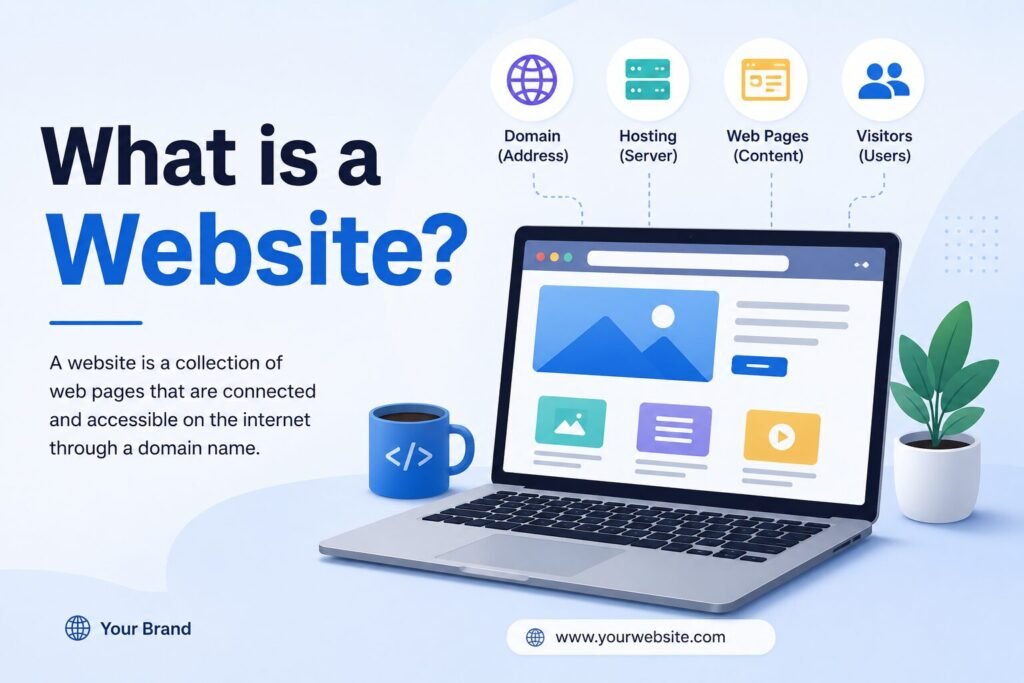
Imagine the internet as a digital city, and in that city you have a piece of land, and it’s called a website. A website is simply a collection of web pages connected together and available on the internet.
When someone types a web address like “yourwebsite.com", the browser opens your website and shows its pages, images, videos, buttons, and content.

In Simple Words
A website is like a digital home or office for a person, business, or idea. Websites can be used in many ways.
For example:
- An online store sells products
- A portfolio website shows creative work
- A blog shares knowledge or experiences
- A company website explains services and contact details
Every website has a purpose, just like every building in a city has one.
2. Why do you need a website?
“Why” must be the first word which should come to your mind before building a website because it will clear or filter out the things which you don’t to create a website
There are different types of websites.
- E-commerce
- Portfolio
- Blog
- Social-media
- Business
- Forums
So you need to know what you want from your website.
A website can help you in many ways: credibility, online presence, business growth, and personal branding.
3. What Do You Need Before You Start?
Before we start building a website, we need to confirm some important things.
- Website purpose (e.g., blog, e-commerce, Business)
- Domain name (it’s your website name, “www.yourwebsite.com”)
- Hosting (a place where your website live)
3.1 Website purpose
Ask yourself what you want to build.
- Portfolio?
- Blog?
- Business?
- Ecommerce?
In order to create a website, your purpose helps you decide the design, pages, and tools you need.
3.2 Domain name
A domain name is the address people type to visit your website.
A domain name should be short, easy to spell and memorable.
3.3 Hosting
We don’t go into technical detail in this blog, but in simple words, to create a website , hosting a place for your website to live. For that, we need to purchase hosting from a hosting provider.
There are some hosting providers, for example, Hostinger.
4. Different Ways to create a Website.
After deciding what type of website we want to build and choosing a name and hosting for our website, it’s time for us to know how we can build a website.
There are a few ways to build a website, from zero coding to full coding; it depends on you which you find better to use.
4.1 Option 1: Website builder
Website builders are platforms that help people create websites without needing advanced coding knowledge. They provide ready-made templates, drag-and-drop tools, and simple customisation options, making website creation faster and easier.
Wix – Known for beginner-friendly drag-and-drop design.
Squarespace – Popular for modern and visually clean websites.
Shopify – Best for creating online stores and e-commerce websites.
4.2 Option 2: WordPress
WordPress is one of the most popular website creation platforms in the world. It allows users to build websites, blogs, portfolios, business websites, and online stores without needing deep coding knowledge.
4.3 Option 3: Coding
It means building a website from scratch. doing everything manually using languages,
For front-end technologies like HTML, CSS and JS and sometimes back-end technologies such as Python or PHP. Instead of using ready-made templates or website builders, developers create the design, structure, and functionality completely from their own code.
Some important things about coding from scratch:
- Full customisation – Every part of the website can be designed exactly as needed.
- Better flexibility – Developers can add custom features and unique functionality.
- Improved performance – Clean and optimised code can make websites faster and more efficient.
- Scalability – Easier to build advanced systems and grow the website over time.
- Learning opportunity – Helps developers deeply understand how websites work.
Coding from scratch is often preferred for custom business websites, web applications, and projects that need complete creative and technical control
5. Step-by-Step Guide to Create a Website
In this blog we will create a website through WordPress because it’s easy to use, highly customisable and SEO friendly.
5.1 Installing wordpress
We can do this in two different ways.
- Hosting providers give one-click WordPress installation
- WordPress local
We will use WordPress local because it’s free and you get everything you need to build a wesbite.
- Download and install “wordpress local” from : www.localwp.com.
- Click on “+” on the lower left side.
- Click on “create a new site” and continue.
- Choose your site name and continue.
- Choose preferred and continue.
- Choose “username” and “Password” and click on “add site”
And after completing these steps, you are ready to go. you will see your website details and click on “run site” on the upper right corner, this will open your default website page.
CONGRATULATIONS. You have successfully built your first website. Now, I know this is not what you wanted; we need to work on the “looks” part. And this is what we will do next.
5.2 Choose a theme
Themes or templates are the looks of your website; in WordPress, you can find many themes which you can use on your website.
For that you need to follow these steps.
In WordPress Dashboard:
- Go to Appearance → Themes
- Click Add New
- Install and activate a theme
I recommend using the GeneratePress theme; it’s lightweight and easy to use and help you to create a website in a day.
And that’s it; you have done all the basic part of website building.
Give yourself a tap on your shoulder…!
In next blog we will work on the design part


amazing post.. keep it up